Current Level 0: NUMPY Level-0
0 / 6 Miles
0 / 5 Assignments
0 / 5 Exams

📖 Course Miles: Passed Failed Pending Not Attempted Scroll to see all miles (6)

Mile 2: Why NumPy Is Used

🎬 YouTube Videos

No YouTube videos available

Check back later for new YouTube content.

📹 Library Videos

Why NumPy Is Use

📚 Content

SECTION 1 WHAT IS NUMPY?

3 min read

What Is NumPy?
NumPy stands for Numerical Python.

It is a Python library designed for working efficiently with numbers, arrays, matrices, multidimensional numerical data, and mathematical calculations.
The most important object in NumPy is called an ndarray, which means N-dimensional array. An array stores multiple values together in an organized numerical structure.

  • Numbers
  • Arrays
  • Matrices
  • Multidimensional numerical data
  • Mathematical calculations

Example array:
[10, 20, 30, 40]

A table of values can also be represented:
[
  [80, 90, 85],
  [75, 88, 92]
]


Your First NumPy Example :

import numpy as np

a = np.array([
    [10, 20, 30],
    [40, 50, 60]
])

b = np.array([1, 2, 3])

print(a + b)

Output :

[10 20 30 40]

What Does This Code Mean?

  • import numpy as np imports NumPy and gives it the standard short name np.
  • np.array(...) creates a NumPy array.
  • numbers stores the created array in a variable.

Where Is This Useful?

  • Student marks
  • Product prices
  • Daily temperatures
  • Sales numbers
  • Sensor readings
  • Image pixels
  • Scientific measurements

Common Beginner Mistake

  • array([10, 20, 30])

Correct approach:

  • import numpy as np
  • arr = np.array([10, 20, 30])

Try It Yourself
Create a NumPy array containing 5, 10, 15, 20, 25 and print it.

Key Takeaway: NumPy is a Python library built around powerful multidimensional arrays for numerical computing.

Sign up or sign in to rate this section
SECTION 2 WHY WAS NUMPY CREATED?

2 min read

Goal
Understand why ordinary Python programming alone is not always ideal for large numerical calculations.

The Problem
Python can already store values using lists:
numbers = [10, 20, 30, 40]

Python lists are excellent general-purpose containers. They can even hold mixed types of objects:
data = [10, "Sara", True, 4.5]

That flexibility is useful in ordinary programming. Numerical computing, however, often involves thousands, millions, or even billions of related numerical values. For that kind of work, we need a structure designed specifically for numerical data.

NumPy's Approach :

import numpy as np
prices = np.array([100, 200, 300])
print(prices + 10)

Output :
[110 210 310]

The operation is expressed at the array level. NumPy applies the addition across the entire array instead of requiring us to manually update each element.


Example :

salaries = np.array([30000, 45000, 52000])
new_salaries = salaries + 2000
print(new_salaries)

Output :

[32000 47000 54000]

Key Takeaway: NumPy was created to make numerical and array-based computation easier, more structured, and more efficient.

Sign up or sign in to rate this section
SECTION 3 PYTHON LISTS VS NUMPY ARRAYS

2 min read

Goal
Understand the practical difference between a Python list and a NumPy array.

Python List
numbers = [10, 20, 30]

  • General purpose
  • Flexible
  • Can contain mixed object types

NumPy Array :

import numpy as np
​​​​​​​numbers = np.array([10, 20, 30])
  • Designed for numerical data
  • Supports direct array calculations
  • Supports multidimensional structures
  • Works naturally with mathematical operations

Example :

numbers = [10, 20, 30]
print(numbers * 2)

Output :

[10, 20, 30, 10, 20, 30]

Now with NumPy:

numbers = np.array([10, 20, 30])
print(numbers * 2)

Output :

[20 40 60]

A Python list repeats when multiplied by 2. A NumPy array performs element-wise multiplication.


Python List                                           NumPy Array

[10, 20, 30] * 2               np.array([10, 20, 30]) * 2
Repeats the list               Multiplies each value
General-purpose structure      Numerical array structure
Good for normal Python data    Excellent for numerical processing

Real-World Use :

prices = np.array([100, 200, 300])
new_prices = prices * 1.10
print(new_prices)

Output :

[110. 220. 330.]

Predict Before You Run
arr = np.array([2, 4, 6])
print(arr + 3)

Answer
[5 7 9]

Key Takeaway:
Python lists are flexible containers. NumPy arrays are specialized structures for efficient numerical and multidimensional operations.

Sign up or sign in to rate this section
SECTION 4 HOW NUMPY MAKES NUMERICAL WORK EASIER

2 min read

Goal
Understand the major advantages NumPy provides when working with numerical data.

Array-Based Calculations :

import numpy as np
​​​​​​​scores = np.array([70, 80, 90])
print(scores + 5)

Output :

[75 85 95]

Multiple Dimensions :

marks = np.array
([
    [80, 90, 85],
    [75, 88, 92]
])
print(marks)

Output :

[[80 90 85]
 [75 88 92]]

Built-In Numerical Operations :

scores = np.array([70, 80, 90])
print(np.mean(scores))

Output :

80.0

Simple Numerical Workflow :

NUMERICAL DATA
↓
Create Array
↓
Select Data
↓
Transform Data
↓
Calculate
↓
Analyze Result

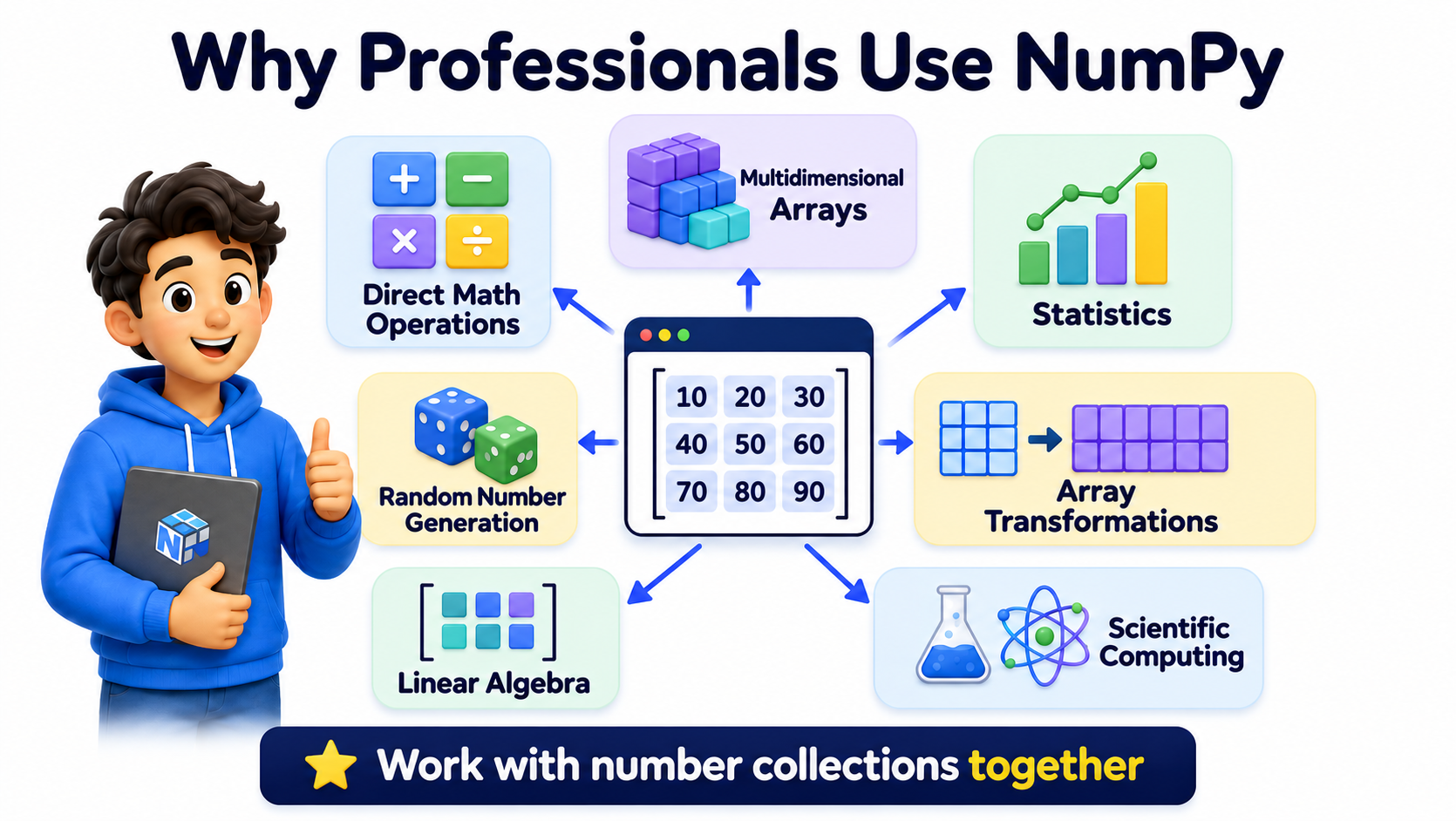
Why Professionals Use NumPy

  • Powerful multidimensional arrays
  • Direct mathematical operations
  • Statistical functions
  • Array transformation tools
  • Numerical routines

• Linear algebra
• Random number generation
• Scientific computing capabilities

Key Takeaway:
NumPy lets us work with collections of numbers as complete numerical structures rather than handling each number individually.

Sign up or sign in to rate this section
SECTION 5 WHERE IS NUMPY USED?

2 min read

Goal
Understand where NumPy appears in real technical projects.

Data Science

  • Representing and transforming numerical datasets
  • Age, salary, score, quantity, temperature

Machine Learning

  • Features, weights, predictions, matrices
  • Numerical data preparation

Scientific Computing

  • Experiments
  • Measurements
  • Simulations
  • Mathematical models

Image Processing

  • Images represented as arrays of pixel values
  • Grayscale and color images use numerical dimensions

Financial Analysis

  • Prices
  • Returns
  • Interest calculations
  • Risk measurements
  • Portfolio values

Engineering & Sensor Data

  • Temperature
  • Pressure
  • Speed
  • Voltage
  • Vibration
  • Distance

Simulation

  • Dice simulations
  • Probability experiments
  • Sample datasets

• Statistical experiments


Image Pixel Example :

[
  [0, 50, 120],
  [200, 255, 100],
  [80, 150, 220]
]

Key Takeaway:
Wherever Python needs structured numerical data, NumPy is likely to be useful.

Sign up or sign in to rate this section
SECTION 6 INSTALLING & IMPORTING NUMPY

2 min read

Goal    
Learn how to make NumPy available in a Python program.

Installing NumPy
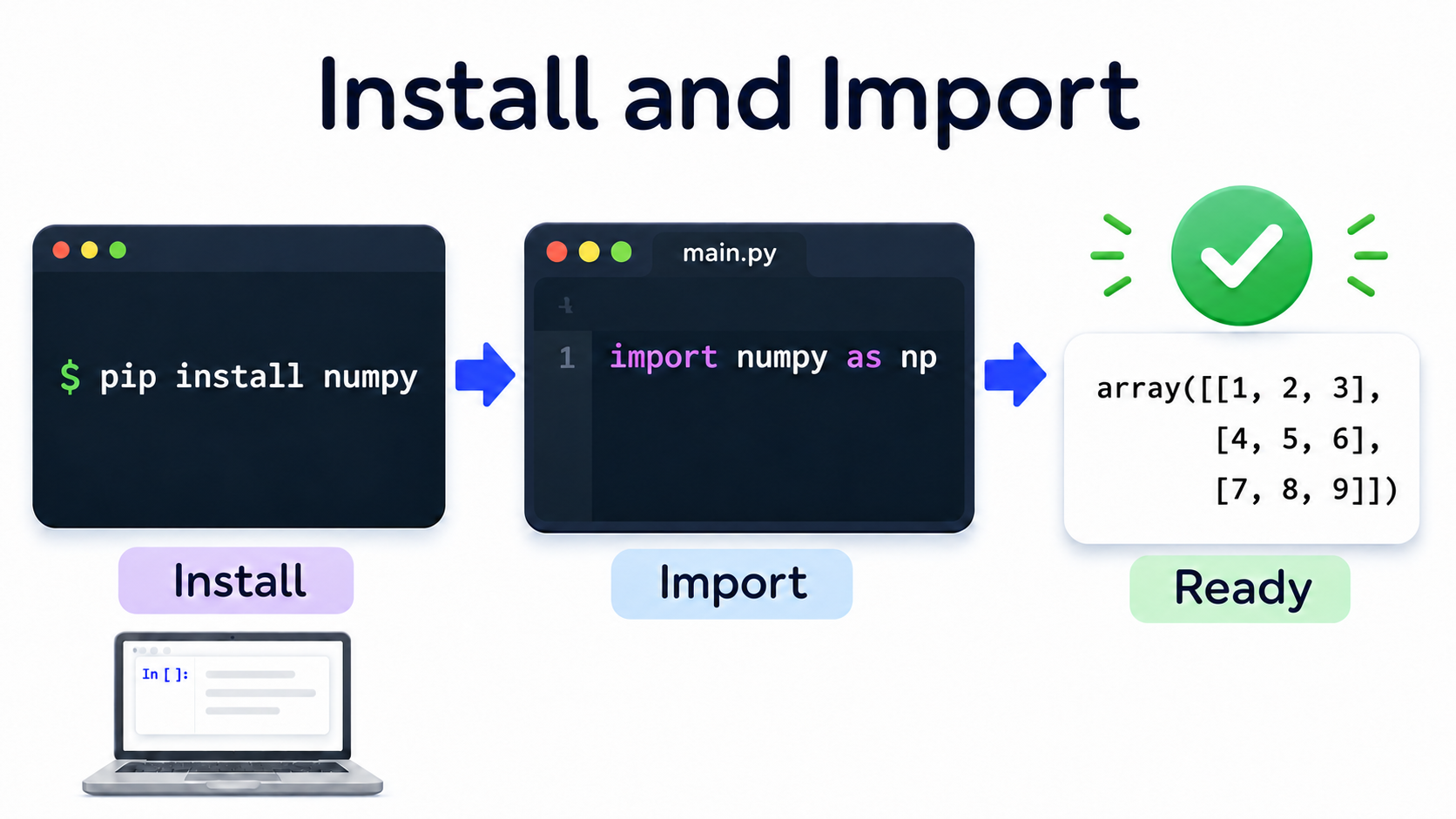
If NumPy is not installed in your Python environment, it can commonly be installed with:
pip install numpy

In notebook environments such as Google Colab, NumPy is usually already available.
Importing NumPy
import numpy as np

np is the standard short alias used throughout the NumPy ecosystem.

Check That NumPy Works

import numpy as np
arr = np.array([1, 2, 3])
print(arr)

Output :

[1 2 3]

Checking the Installed Version
print(np.__version__)

Common Beginner Mistake :

import numpy
arr = np.array([1, 2, 3])

Here, np was never defined.

Correct standard approach:
import numpy as np

Key Takeaway:
Import NumPy once using import numpy as np, then use the np prefix to access NumPy functionality.

Sign up or sign in to rate this section
SECTION 7 YOUR FIRST NUMPY EXPERIENCE

2 min read

Goal    
Bring together the concepts learned in Mile 2 and write a complete beginner NumPy program.

Scenario
A student received these test scores: 78, 85, 92, 70, 88.

Code :

import numpy as np
​​​​​​​scores = np.array([78, 85, 92, 70, 88])
print("Scores:", scores)
print("Average:", np.mean(scores))
print("Highest:", np.max(scores))
print("Lowest:", np.min(scores))

Output :

Scores: [78 85 92 70 88]
Average: 82.6
Highest: 92
Lowest: 70

Understanding the Code :

  • np.array(...) creates the NumPy array.
  • np.mean(scores) calculates the average.
  • np.max(scores) finds the highest value.
  • np.min(scores) finds the lowest value.

Try It Yourself
prices = np.array([120, 250, 180, 300, 150])

  • Find the average price.
  • Find the highest price.
  • Find the lowest price.

Mini Challenge
Create an array containing 15, 20, 25, 30, 35, then:

  • Print the complete array.
  • Add 5 to every value.
  • Find the average.
  • Find the maximum value.

Key Takeaway:
​​​​​​​You can now create a NumPy array and perform simple numerical operations on an entire collection of values.

Sign up or sign in to rate this section

📝 Assignment

Available Assignments
Assignment Pass Mark Duration Actions
Why NumPy Is Used
70% 01:00:00

📊 Exam

Available Exams
Exam Pass Mark Duration Questions Actions
Python List vs NumPy Array
70% 00:30:00 5

💬 Comments & Discussion

Sign up free or sign in to post a comment
Sign up free or sign in
No comments yet

Be the first to share your thoughts!